Calling WebMCP Tools from Outside the Browser

This is the third time I'm writing about WebMCP. First I covered the fundamentals in plain JavaScript - how a page registers structured tools instead of making agents guess at the DOM. Then I showed how Angular 22 lets you register those tools globally, per route, per service, and even straight from a Signal Form. Both of those were about the producer side: how a website declares what an AI agent is allowed to do.
This one is about the consumer side. And it circles back to something I flagged in that very first post. Back then I called it out as both a wish and a limitation:
A real game changer would be enabling agents to use WebMCP without requiring the browser or application to be open - allowing them to operate independently.
At the time the honest limitation was "Browsing Context Required: tools must run in a visible browser tab. There's no headless mode." So the natural question - sharpened by Kasper Kulikowski's excellent The three homes of the Agentic Web - became:
Could I call a website's WebMCP tools from an agent that lives outside the browser entirely?
The three homes, briefly
Kasper frames agents by where they live:
- On-site - the website ships its own assistant. Maximum control, minimum reach.
- In-browser - the user brings a co-browsing agent (an extension or a browser feature) that shares their tab and session.
- Off-browser - the agent runs somewhere else: a cloud service, a server, a laptop script. Maximum reach, minimum control. The website might never be seen by a human.
Most WebMCP activity I'd seen lived in the in-browser home, and today that mostly means developer tools reading navigator.modelContext from inside the tab: the WebMCP pane in Chrome DevTools for inspecting and invoking tools by hand, and the Model Context Tool Inspector, which is already agent-ish - type a prompt and Gemini picks and calls the page's tools for you. The on-site home is rarer, but real: this blog's own assistant is wired to the very same tools it publishes to WebMCP, so it and the inspector call one shared set side by side.
What all of those share is that something inside the browser does the calling. That made me wonder whether the third home - off-browser - was locked out by design.
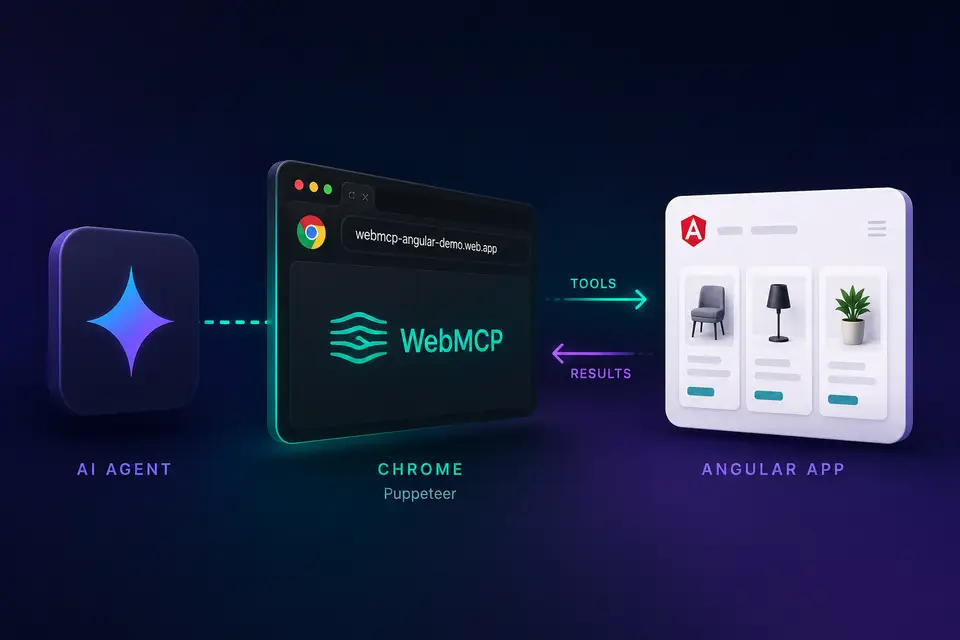
It isn't. navigator.modelContext is just page state, and a page can be driven by automation. So I built a small off-browser agent that opens my Angular WebMCP demo in a real Chrome, discovers whatever tools are registered on the current route, and answers using only their results.
The setup
Two cooperating parts, in one repo:
- The Angular 22 demo from the last article, which registers WebMCP tools at four different scopes (global, route, service, and form - covered in Part 2).
external-agent/- a Google ADK agent that drives Chrome with Puppeteer, lists the page's tools, and calls them.
The critical detail is that the agent never talks to my application code. It talks to the browser, and the browser exposes the WebMCP surface.
Reaching navigator.modelContext from the outside
The whole experiment hinges on one line. When Puppeteer launches Chrome with the WebMCP feature enabled, the Page object gains a webmcp handle that mirrors the page's navigator.modelContext:
const browser = await puppeteer.launch({
  channel: 'chrome-canary',
  args: ['--enable-features=WebMCP'],
});

const page = await browser.newPage();
await page.goto(url);

// The tools the page has registered *right now*, on this route.
const tools = page.webmcp.tools();

for (const tool of tools) {
  console.log(tool.name, tool.description, tool.inputSchema);
}
const browser = await puppeteer.launch({
channel: 'chrome-canary',
args: ['--enable-features=WebMCP'],
});
const page = await browser.newPage();
await page.goto(url);
// The tools the page has registered *right now*, on this route.
const tools = page.webmcp.tools();
for (const tool of tools) {
console.log(tool.name, tool.description, tool.inputSchema);
}That's it. No injected script, no reverse-engineering of the DOM, no guessing which buttons to click. The page publishes a machine-readable list of capabilities, and from outside the browser I get their names, descriptions, and input schemas for free.
Run that against the demo's /products route and the route-scoped filterProducts tool shows up next to the global searchProducts. Navigate to /cart and the service-scoped cart tools appear instead. The off-browser agent sees exactly what a human - or an in-browser extension - would see on the same page.
Wrapping it in a session
A one-shot script is fine for a sanity check, but an agent needs to open a page once, list tools, invoke a few, and clean up. I put that behind a small WebMcpSession so the ADK tools all share one browser tab:
export class WebMcpSession {
  private browser: Browser | null = null;
  private page: WebMcpEnabledPage | null = null;

  async ensureOpen(url: string): Promise<void> {
    if (this.page && this.currentUrl === url) return;
    // ...navigate or launch...
  }

  listTools(): WebMcpToolDescriptor[] {
    return this.page!.webmcp.tools().map((tool) => ({
      name: tool.name,
      description: tool.description,
      inputSchema: tool.inputSchema ?? null,
    }));
  }

  async invokeTool(name: string, args: Record<string, unknown>) {
    const tool = this.page!.webmcp.tools().find((t) => t.name === name);
    if (!tool) throw new Error(`Tool "${name}" not found on the current page.`);
    const rawResult = await tool.execute(args);
    return { tool: name, result: sanitizeToolResult(rawResult) };
  }
}
export class WebMcpSession {
private browser: Browser | null = null;
private page: WebMcpEnabledPage | null = null;
async ensureOpen(url: string): Promise<void> {
if (this.page && this.currentUrl === url) return;
// ...navigate or launch...
}
listTools(): WebMcpToolDescriptor[] {
return this.page!.webmcp.tools().map((tool) => ({
name: tool.name,
description: tool.description,
inputSchema: tool.inputSchema ?? null,
}));
}
async invokeTool(name: string, args: Record<string, unknown>) {
const tool = this.page!.webmcp.tools().find((t) => t.name === name);
if (!tool) throw new Error(`Tool "${name}" not found on the current page.`);
const rawResult = await tool.execute(args);
return { tool: name, result: sanitizeToolResult(rawResult) };
}
}invokeTool is the part that matters. It calls tool.execute(args), which runs the page's own tool handler in the tab and returns its result. The handler still runs inside the (headless) browser. What changed is who asked for it: a process running outside the browser entirely.
Giving the agent exactly three tools
The agent itself is a Google ADK LlmAgent. I deliberately gave it only three tools, all thin wrappers over the session: list_webmcp_tools, invoke_webmcp_tool, and close_browser.
export const listWebMcpToolsTool = new FunctionTool({
  name: 'list_webmcp_tools',
  description:
    'Open a WebMCP-enabled page and list its tools with name, description, and inputSchema.',
  parameters: optionalUrlParameters,
  execute: async ({ url }) => {
    await webMcpSession.ensureOpen(resolvePageUrl(url));
    return { count: webMcpSession.listTools().length, tools: webMcpSession.listTools() };
  },
});
export const listWebMcpToolsTool = new FunctionTool({
name: 'list_webmcp_tools',
description:
'Open a WebMCP-enabled page and list its tools with name, description, and inputSchema.',
parameters: optionalUrlParameters,
execute: async ({ url }) => {
await webMcpSession.ensureOpen(resolvePageUrl(url));
return { count: webMcpSession.listTools().length, tools: webMcpSession.listTools() };
},
});Notice what the agent can't do: it cannot invent capabilities. It discovers the page's tools, then it may only call tools that were actually returned by list_webmcp_tools. The website stays in charge of what's possible - the agent just gets reach.
The system prompt makes the workflow explicit and boring on purpose:
- Call
list_webmcp_toolsonce. - Call
invoke_webmcp_tool. - Answer only from those results.
- Call
close_browserwhen finished.
The model can run on Gemini (gemini-3.5-flash by default) or a local Ollama model, chosen from environment variables - the browser-driving code doesn't care which.
Running it
With the demo running locally and a .env in place, it's two commands:
cp .env.example .env        # set GEMINI_API_KEY and WEBMCP_URL=http://localhost:4200
npm run external-agent      # interactive ADK CLI
cp .env.example .env # set GEMINI_API_KEY and WEBMCP_URL=http://localhost:4200
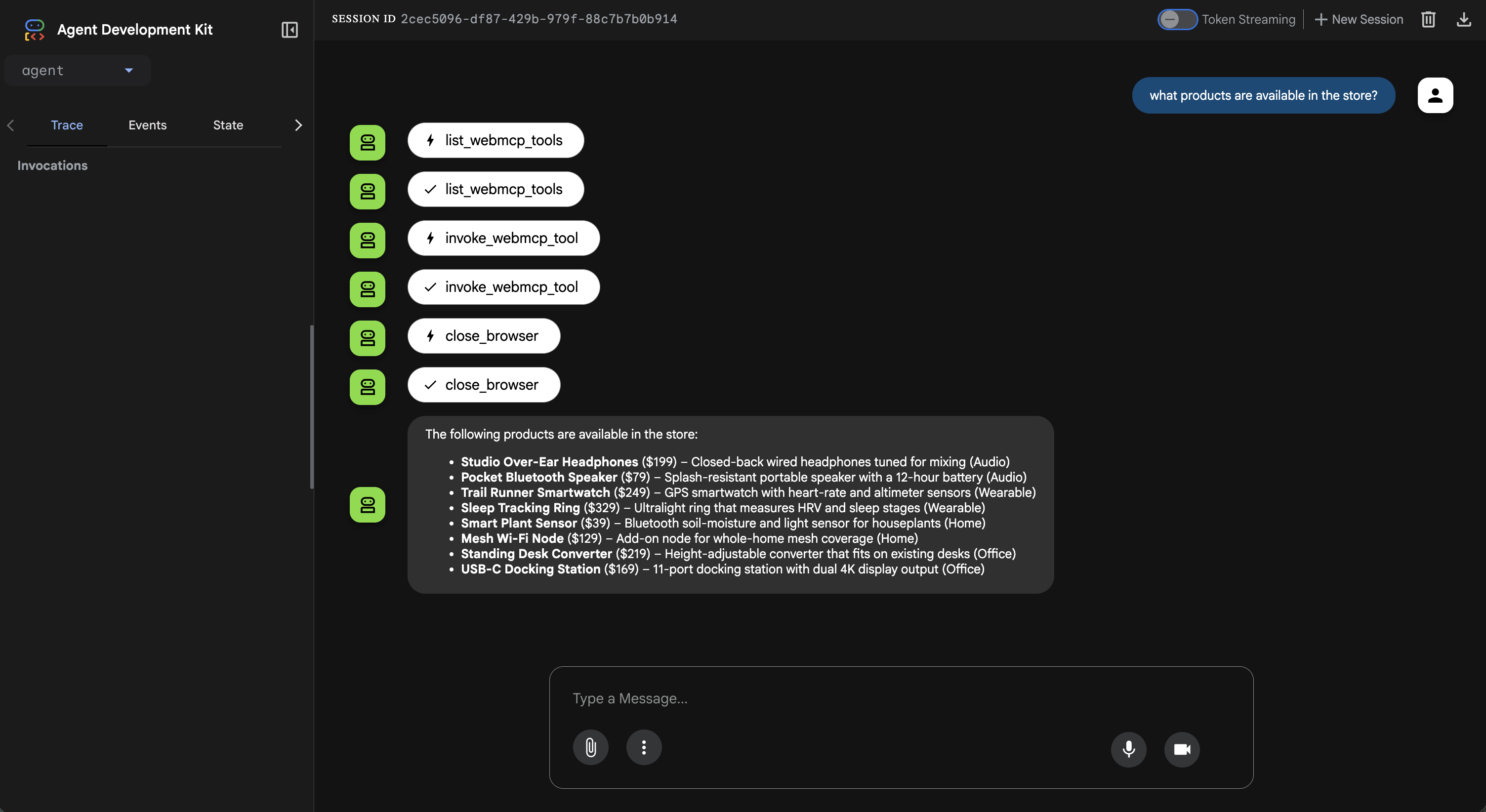
npm run external-agent # interactive ADK CLIAsk it something like "What products are available in the store?" and you can watch the sequence unfold: it opens /products in (headless) Chrome, reads WebMCP tools off the page, invokes one of them (searchProducts), and answers from the JSON that came back - then closes the browser.
For the bare-bones version - no LLM, just proof that the surface is reachable - there's a Puppeteer script that lists tools and exits:
npm run experiment:build
npm run experiment:start
npm run experiment:build
npm run experiment:startRequires Chrome Canary with --enable-features=WebMCP, since that's what makes page.webmcp available.
So, does it work?
Yes - and that's the point worth sitting with.
The tools I registered in the last article, meant for an on-site assistant and inspectable by an in-browser DevTools extension, were callable by an agent that lives entirely off-browser. I didn't build a special API, expose a backend endpoint, or open a port. The WebMCP surface a website ships for its own assistant is the same surface an outside agent can reach by driving a real browser.
WebMCP is a way to hand your tools to an agent you don't own. The demo just pushes that idea to the far end of the reach-versus-control curve - an agent with no shared human session, no extension, sitting outside the browser, still executing the exact functions the page approved.
And this is exactly what I was reaching for a few months ago. Back in the first article I called the real game changer "enabling agents to use WebMCP without requiring the browser or application to be open." Invoking a tool from outside the browser context is precisely that shift - and it's what happens here. The caller no longer has to be a human, an extension, or the site's own assistant sitting inside the tab; it can be a process running somewhere else entirely.
There's one honest asterisk: a browser is still in the loop under the hood. The tool runs in a real Chrome my agent drives, so this isn't literally "no browser at all." But the thing that decides and initiates the call has left the browser - and that's the part that actually matters.
A few honest limitations
"Who is knocking?" is unanswered here. Kasper's post raises the real business question - deciding which agents to welcome. My experiment happily lets any Puppeteer process in. Authentication, consent, and agent identity are exactly the parts a real deployment would need, and they're out of scope for a demo.
Session and identity are missing. Driving a fresh browser means there's no logged-in user, no cart from last week, no "extra pair of hands" - the agent has no keys. Anything requiring auth would need real credentials, cut for the occasion.
Takeaway
The interesting result isn't the agent. It's the confirmation that a single WebMCP surface serves all three homes at once.
A website declares its capabilities once, as structured tools. An on-site assistant can use them. An in-browser co-browsing agent can use them. And - as this experiment shows - an off-browser agent can drive a browser and use the very same ones. The producer side I covered last time and the consumer side I explored here meet at navigator.modelContext.
And that shared surface is what makes Kasper's closing idea feel within reach. When every home speaks the same tool protocol, one agent handing work to another is no longer a thought experiment - it's just two callers reaching for the same set of tools.
Resources
- The three homes of the Agentic Web - the article that inspired this experiment
- Part 1: WebMCP fundamentals - where I first raised the "operate without the browser open" question
- Part 2: WebMCP in Angular - registering the tools this agent calls
- Demo Source Code
- Demo App
- Angular WebMCP Documentation
- Google Agent Development Kit (ADK)
- Puppeteer
Comments