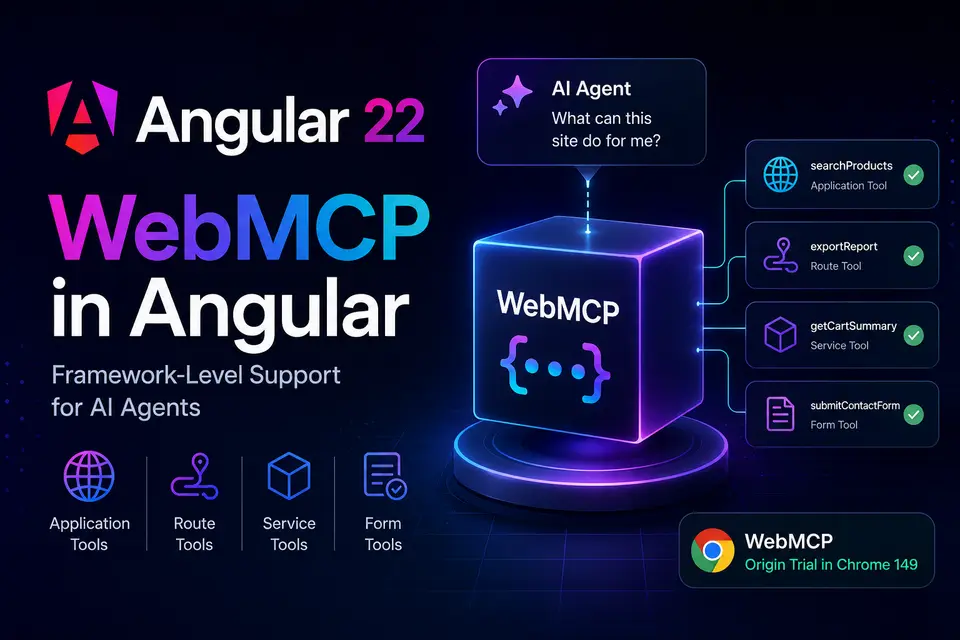
WebMCP in Angular: Framework-Level Support for AI Agents

A few months ago I wrote about WebMCP as a proposed web standard that lets websites expose structured tools to AI agents. Back then, integrating it in Angular meant writing custom services, managing tool registration manually, and handling lifecycle cleanup yourself.
That's changing.
Angular 22 introduces experimental, framework-level support for WebMCP. You can now register tools through Angular's dependency injection system, scope them to routes, and even turn Signal Forms into AI-ready tools automatically — without any custom abstraction layer.
On top of that, during Google I/O 2026, the Chrome team announced that WebMCP is graduating to an Origin Trial in Chrome 149. Real users will soon be able to interact with WebMCP-enabled sites without manually enabling experimental flags.
Four Ways to Register Tools
Angular 22 exposes three functions and one form option for registering WebMCP tools. Each targets a different lifecycle scope.
1. Application-wide: provideExperimentalWebMcpTools
The simplest approach — add tools to your application providers and they're available for the entire app lifetime:
// app.config.ts
export const appConfig: ApplicationConfig = {
  providers: [
    provideExperimentalWebMcpTools([
      {
        name: 'searchProducts',
        description: 'Search the product catalog by name or category. Returns matching products with price and availability.',
        inputSchema: {
          type: 'object',
          properties: {
            query: { type: 'string', description: 'Search keywords.' },
            category: { type: 'string', enum: ['Apparel', 'Accessories', 'Books'] },
          },
          required: ['query'],
          additionalProperties: false,
        },
        execute: ({ query, category }) => {
          const products = inject(ProductService).search(query, category);
          return { content: [{ type: 'text', text: JSON.stringify(products) }] };
        },
      },
    ]),
  ],
};
// app.config.ts
export const appConfig: ApplicationConfig = {
providers: [
provideExperimentalWebMcpTools([
{
name: 'searchProducts',
description: 'Search the product catalog by name or category. Returns matching products with price and availability.',
inputSchema: {
type: 'object',
properties: {
query: { type: 'string', description: 'Search keywords.' },
category: { type: 'string', enum: ['Apparel', 'Accessories', 'Books'] },
},
required: ['query'],
additionalProperties: false,
},
execute: ({ query, category }) => {
const products = inject(ProductService).search(query, category);
return { content: [{ type: 'text', text: JSON.stringify(products) }] };
},
},
]),
],
};The execute callback runs in the injection context of the associated Injector, so inject() works directly inside it. No platform checks, no afterNextRender() — Angular handles SSG compatibility internally.
2. Route-scoped: provideExperimentalWebMcpTools in route providers
Not every tool should be available globally. Scoping tools to routes gives the agent an accurate picture of what's currently possible:
// app.routes.ts
export const routes: Routes = [
  {
    path: 'dashboard',
    loadComponent: () => import('./pages/dashboard/dashboard.component'),
    providers: [
      provideExperimentalWebMcpTools([
        {
          name: 'exportReport',
          description: 'Exports the current dashboard analytics.',
          inputSchema: { type: 'object', properties: {} },
          execute: () => ({
            content: [{ type: 'text', text: 'Export triggered.' }],
          }),
        },
      ]),
    ],
  },
];
// app.routes.ts
export const routes: Routes = [
{
path: 'dashboard',
loadComponent: () => import('./pages/dashboard/dashboard.component'),
providers: [
provideExperimentalWebMcpTools([
{
name: 'exportReport',
description: 'Exports the current dashboard analytics.',
inputSchema: { type: 'object', properties: {} },
execute: () => ({
content: [{ type: 'text', text: 'Export triggered.' }],
}),
},
]),
],
},
];By default, route-scoped tools stay registered after navigation. To get automatic cleanup, add withExperimentalAutoCleanupInjectors to your router config:
provideRouter(routes, withExperimentalAutoCleanupInjectors())provideRouter(routes, withExperimentalAutoCleanupInjectors())Without it, an agent could still call a "dashboard" tool while the user is on a completely different page.
3. Service-scoped: declareExperimentalWebMcpTool
For tools tied to a service lifecycle, call declareExperimentalWebMcpTool directly in the constructor. The tool is automatically unregistered when the injection context is destroyed:
@Injectable({ providedIn: 'root' })
export class CartService {
  readonly items = signal<CartItem[]>([]);

  constructor() {
    declareExperimentalWebMcpTool({
      name: 'getCartSummary',
      description: 'Returns the current cart contents and total price.',
      inputSchema: { type: 'object', properties: {} },
      execute: () => ({
        content: [{ type: 'text', text: JSON.stringify(this.items()) }],
      }),
    });
  }
}@Injectable({ providedIn: 'root' })
export class CartService {
readonly items = signal<CartItem[]>([]);
constructor() {
declareExperimentalWebMcpTool({
name: 'getCartSummary',
description: 'Returns the current cart contents and total price.',
inputSchema: { type: 'object', properties: {} },
execute: () => ({
content: [{ type: 'text', text: JSON.stringify(this.items()) }],
}),
});
}
}4. Form-scoped: Signal Forms integration
This is where Angular 22's approach really shines. If you're using the new Signal Forms API, you can turn any form into a WebMCP tool with a single config option:
readonly contactForm = form(
  this.model,
  (f) => {
    required(f.name);
    required(f.email);
    minLength(f.message, 20);
  },
  {
    experimentalWebMcpTool: {
      name: 'submitContactForm',
      description: 'Submits a contact message. Requires name, email, and a message of at least 20 characters.',
    },
    submission: {
      action: async (value) => this.contactService.send(value),
    },
  },
);
readonly contactForm = form(
this.model,
(f) => {
required(f.name);
required(f.email);
minLength(f.message, 20);
},
{
experimentalWebMcpTool: {
name: 'submitContactForm',
description: 'Submits a contact message. Requires name, email, and a message of at least 20 characters.',
},
submission: {
action: async (value) => this.contactService.send(value),
},
},
);Angular infers the JSON schema from the initial model values, maps validators to required fields, and connects the tool directly to the form's submission handler. If the agent provides invalid data, validation errors are returned so it can self-correct and retry.
See It in Action
I put together a demo application that covers all four scopes in a single Angular 22 project:
- Live demo: webmcp-angular-demo.web.app
- Source code: github.com/9kubczas4/web-mcp-angular
Each route registers tools at a different scope. Open Chrome's WebMCP DevTools extension and watch navigator.modelContext change as you navigate between pages.
| Route | Tool | Scope |
|---|---|---|
/ |
— | overview |
/products |
filterProducts |
route-scoped |
/dashboard |
exportReport |
route-scoped |
/cart |
getCartSummary, addToCart |
service-scoped |
/contact |
submitContactForm |
form-scoped |
The searchProducts tool is registered globally in app.config.ts and is available on every route.
A Few Things to Keep in Mind
Validate inputs at runtime. Angular does not validate that agent inputs actually match your schema. Add explicit checks inside execute before using the values.
Watch for name collisions. WebMCP throws if two tools share the same name. Avoid registering tools in components that can appear multiple times on the same page.
Use the polyfill for testing. The demo uses @mcp-b/webmcp-polyfill imported as the very first statement in main.ts. This ensures navigator.modelContext exists before bootstrapApplication runs in browsers without native WebMCP support.
Current Status
- WebMCP standard: Origin Trial starting in Chrome 149, announced at Google I/O 2026
- Angular support: Experimental — APIs may change outside of major versions
- Signal Forms integration: Requires the new
form()API from@angular/forms/signals - Browser support: Chrome only for now
The fact that both the Chrome team and the Angular team are investing in this simultaneously is a strong signal. If you're building Angular applications that could benefit from AI agent interactions, now is a good time to experiment.
Comments