MCP Apps: Rendering Your Angular UI Inside ChatGPT

I've written before about MCP servers that expose tools to AI agents, and about WebMCP that lets agents drive your existing web app. Both are about giving the agent actions.
MCP Apps are about something different: giving the agent a user interface.
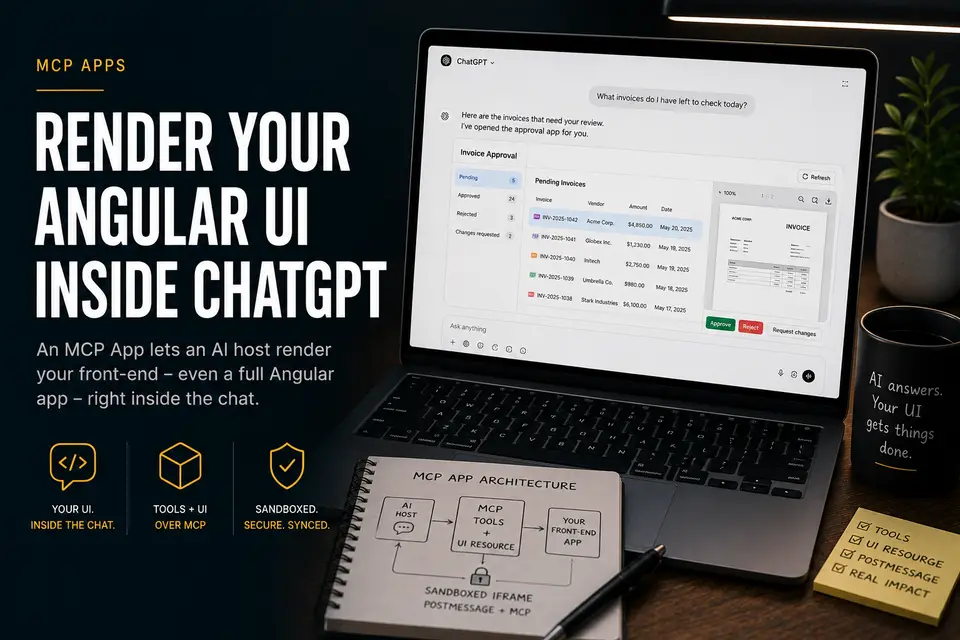
Instead of the AI replying with a wall of text or a markdown table, it can render your front-end - a real, interactive UI - directly inside the conversation. The user clicks buttons, scrolls a PDF, approves a form, and the chat stays in sync the whole time.
And here's the part most people miss: that UI can be any front-end app. A vanilla HTML page, a React widget - or, as in my demo, a full Angular application.
What Is an MCP App?
The Model Context Protocol started as a way for AI hosts to call tools on a server. MCP Apps (the mcp-app extension) add one more capability: a tool can return not just data, but a reference to a UI resource - an HTML document the host renders in a sandboxed iframe.
So the contract becomes:
- The server exposes tools (
list_invoices,get_invoice,submit_decision). - The server exposes a UI resource (
ui://invoice-approval/app) - an inlined single-page app. - Each tool is tagged with
_meta.ui.resourceUri, telling the host: "when you call me, show this UI."
The host (ChatGPT, Claude Desktop, etc.) loads the iframe, the embedded app talks back to the host over postMessage, and the result is a hybrid experience: natural-language on the outside, a purpose-built UI on the inside.
The key insight: the front-end is not special. It's a normal app you already know how to build. In the demo it's Angular 22 and a PDF viewer - bundled into a single HTML file and served as an MCP resource.
See It in Action
Here's the demo - an invoice-approval Angular app rendered live inside ChatGPT. I ask a single, plain-language question:
"What invoices do I have left to check today?"
The AI calls the tools, and my UI appears in the chat: an invoice list, a PDF preview, and clear actions to approve, reject, or request changes.
Notice what's happening: the user can act in the UI or keep talking to the assistant, and both stay consistent. A decision made by clicking a button and a decision made by asking the agent end up in exactly the same place.
How It Works
The flow is simpler than it looks. One server hosts both the MCP tools and the UI bundle; the AI host wires them together.
sequenceDiagram
    participant User
    participant Host as AI Host (ChatGPT)
    participant Server as MCP App Server
    participant UI as Angular UI (iframe)

    User->>Host: "Show me invoices to approve"
    Host->>Server: callTool list_invoices
    Server-->>Host: structured data + _meta.ui.resourceUri
    Host->>Server: readResource ui://invoice-approval/app
    Server-->>Host: inlined Angular HTML bundle
    Host->>UI: render iframe + forward tool result
    UI->>Host: ui/initialize handshake (postMessage)
    User->>UI: clicks "Approve"
    UI->>Server: callTool submit_decision (over MCP)
    Server-->>UI: updated invoice
    UI-->>Host: sizeChanged / state in sync
The Angular app is built, then inlined into a single HTML file so it can be served as one MCP resource. At runtime it talks to the host through a small bridge service - using postMessage for the handshake and tool-result forwarding, and falling back to direct HTTP calls to /mcp when a host doesn't resolve them.
Why This Matters for Business
The biggest win is no context switching. The user never leaves the chat. One question - "What invoices do I have left to check today?" - replaces opening the accounting tool, finding the queue, downloading a PDF, and clicking through an approval screen. Work that used to span several tools now happens in a single interface, in the user's own words.
Tables and text are fine for read-only answers. But the moment a task needs review, judgement, or a controlled action, a real UI wins. A few scenarios where MCP Apps shine:
- Approval workflows - invoices, expenses, time-off, PRs. The agent surfaces what needs a decision; the human approves inside the chat with full context (like the PDF) in front of them.
- Dashboards & reports - render an interactive chart or KPI board instead of dumping numbers as text.
- Forms with validation - booking, onboarding, configuration. The UI enforces rules the agent shouldn't have to guess.
- Document review - contracts, invoices, claims - shown with a proper viewer, annotations, and structured actions.
- Internal tools - expose an existing back-office app to non-technical staff through natural language, without retraining them on the UI.
The business value is that you reuse the front-end investment you already have. Your design system, your accessibility work, your validation logic - all of it shows up inside the AI experience instead of being re-described in prose.
Where Does the MCP Server Live?
An MCP App server is just an HTTP service that speaks the MCP streamable transport on /mcp and serves a UI resource. That makes deployment refreshingly boring - anywhere you can run a Node container:
- Google Cloud Run (what the demo uses) - containerize with a multi-stage
Dockerfile, deploy, and pinPUBLIC_BASE_URLto the assigned URL so PDF and asset links resolve. Scales to zero, costs nothing idle. - Any container platform - AWS App Runner / ECS, Azure Container Apps, Fly.io, Render, or a plain VM behind a reverse proxy.
- Serverless / edge - viable as long as the runtime supports streaming HTTP responses and a long-lived session per connection.
The deploy is a single script: build the image, gcloud run deploy, then update PUBLIC_BASE_URL. Point any MCP-capable host at https://<your-service>/mcp and the tools - and the UI - show up.
What's Next
This was the concept: an MCP App is just a front-end you already know how to build, handed to an AI host to render inside the conversation. The demo proves an entire Angular app can live there.
In the next, more technical post I'll go deeper into the setup: how the Angular bundle is inlined into a single resource, how the McpBridgeService handshake works, how tool results stay in sync with signal state, and how to wire _meta.ui.resourceUri end to end.
Resources
- Model Context Protocol
- Part 1: Building an MCP Server for a Library
- WebMCP: Teaching AI Agents to Interact with Your Web App
Have you tried building an MCP App? I'd love to hear what front-end you'd put in front of an AI host.
Comments