
WebMCP Goal-Oriented Evals: Did the Agent Actually Solve the Task?

A pass rate tells us how often an eval passed. Its reports help explain what happened: did the agent leave the task unfinished, or did the judge lack the evidence needed to assess it?
Using real Hotel Chain reports, we will write a scenario, run the suite, and examine two failed cases. We will also look at the limits of judge verdicts and how to plan repeated runs and model comparisons.
In the previous post, I introduced goal-oriented evals. For a broader introduction to evals, see Maud Nalpas's video.
A goal-oriented eval checks whether the agent reached the requested outcome. It does not require a fixed list or order of tool calls. We define what success looks like, then look for evidence in the conversation and tool results.
This follow-up uses the Hotel Chain demo from my goal-oriented evals PR.
Imagine a family of two adults and one child needs a three-night stay in Tokyo. They want breakfast and a gym, and their budget is under $200 per night. They also want the booking form filled in so they can review it before submitting.
The agent says it found a suitable hotel. Has it completed the task? It may have left out the child, picked a room over budget, or submitted a reservation the family wanted to review first.
Let's use this example to define success, run a simulation, and see what its report can tell us.

Four Hotel Chain scenarios
The PR adds four simulations to the Hotel Chain demo. Each covers a different user request and checks whether the agent completes it.
| Case | What a passing run shows |
|---|---|
| Prepare the only matching Tokyo hotel for confirmation | The agent finds the only hotel matching the dates, guest count, $200 budget, gym, and breakfast requirements, then fills in the form for the user to review without submitting it. |
| Find a family-and-pet option without booking it | The agent finds a Cleveland hotel for two adults, two children, and a dog that costs no more than $220 per night and has free parking and washer access. It opens the hotel details without making a reservation. |
| Recover from an obsolete Cleveland search | After the user's plans change, the agent drops the old Cleveland search and its price and parking filters, finds a Tokyo hotel with a spa and dining, and checks late checkout without starting a booking. |
| Explain an impossible Paris combination | The agent explains that no Paris hotel meets the $200 budget, breakfast, and spa requirements together, instead of presenting either near match as a solution. |
The full suite contains the user scenarios and success criteria for all four cases. Let's look at the first one in more detail.
Describe the first outcome
The first case asks for the Tokyo stay in a short conversation. It gives the simulated user the travel details and gives the judge separate success criteria:
{
  "name": "Prepare the only matching Tokyo hotel for confirmation",
  "userScenario": "You are arranging a three-night Tokyo stay beginning 2027-04-12 for two adults and one child. You need both a gym and breakfast, and the room must cost no more than $200 per night. Once a matching hotel is found, you want its reservation form filled out with the guest details Maya Chen and maya.chen@example.com so you can review and submit it yourself.",
  "maxTurns": 10,
  "maxDurationMs": 240000,
  "successCriteria": "Metropolis Loft Hotel was selected for check-in on 2027-04-12, three nights, two adults, and one child after retrieved results corroborated its $185 price and its gym and breakfast. The complete_booking form tool populated Maya Chen and maya.chen@example.com but returned pending form submission, and the agent explained that the form was ready for the user to review and submit. A confirmed reservation, selecting another hotel, or losing any trip detail is not success."
}
{
"name": "Prepare the only matching Tokyo hotel for confirmation",
"userScenario": "You are arranging a three-night Tokyo stay beginning 2027-04-12 for two adults and one child. You need both a gym and breakfast, and the room must cost no more than $200 per night. Once a matching hotel is found, you want its reservation form filled out with the guest details Maya Chen and maya.chen@example.com so you can review and submit it yourself.",
"maxTurns": 10,
"maxDurationMs": 240000,
"successCriteria": "Metropolis Loft Hotel was selected for check-in on 2027-04-12, three nights, two adults, and one child after retrieved results corroborated its $185 price and its gym and breakfast. The complete_booking form tool populated Maya Chen and maya.chen@example.com but returned pending form submission, and the agent explained that the form was ready for the user to review and submit. A confirmed reservation, selecting another hotel, or losing any trip detail is not success."
}The case does not prescribe the full search and filtering sequence. It does, however, name complete_booking: in this demo, that form tool populates the guest details and leaves submission to the user. The criteria therefore include a tool-specific evidence requirement.
For a test that accepts any valid way to prepare the form, describe the required field values and pending submission state instead, and verify them independently. The example above preserves the criteria used in the saved report.
Run the suite against the demo
The examples in this article use the simulation runner and Hotel Chain suite from the WebMCP Evals repository. Clone the repository and build the runner. This command runs each of the four cases five times:
git clone https://github.com/GoogleChromeLabs/webmcp-tools.git
cd webmcp-tools
cd webmcp-evals
npm ci
npm run build

node dist/bin/webmcp-evals.js simulate \
  --url https://googlechromelabs.github.io/webmcp-tools/demos/hotel-chain/ \
  --simulations examples/hotel-chain/simulations.json \
  --model google:gemini-3.5-flash \
  --user-model google:gemini-3.5-flash \
  --judge-model openai:gpt-5 \
  --max-steps 10 \
  --runs 5 \
  --reporter console json html \
  --output-dir .evals/hotel-chain \
  --verbose
git clone https://github.com/GoogleChromeLabs/webmcp-tools.git
cd webmcp-tools
cd webmcp-evals
npm ci
npm run build
node dist/bin/webmcp-evals.js simulate \
--url https://googlechromelabs.github.io/webmcp-tools/demos/hotel-chain/ \
--simulations examples/hotel-chain/simulations.json \
--model google:gemini-3.5-flash \
--user-model google:gemini-3.5-flash \
--judge-model openai:gpt-5 \
--max-steps 10 \
--runs 5 \
--reporter console json html \
--output-dir .evals/hotel-chain \
--verboseYou need API keys for Google and OpenAI, plus Chrome Canary with WebMCP enabled. A prefix such as google: or openai: tells the runner which provider to use. Each run opens the hosted demo, finds its WebMCP tools, and runs the case.
A simulation can use three model roles:
- Agent model: The assistant being tested. It receives the user's request and uses the webpage's WebMCP tools. Every case uses an agent model.
- Simulated user model: Acts as the person described in a
userScenarioand replies during the conversation. AuserMessagesends one fixed message, so it does not need a user model. - Judge model: Checks the conversation and tool results against
successCriteria. A case without success criteria does not need a judge.
Best practice: Consider a judge from a different model family as a precaution, then validate its verdicts on cases you have reviewed yourself. Preference Leakage studies bias involving models trained on synthetic data and judges related to the data generators. It motivates caution, but does not establish that a different-family judge improves this simulation.
In this suite, all four cases define success criteria, so every run uses a judge. The Cleveland recovery case uses a fixed userMessage; the other three use a simulated user. In this command, Gemini 3.5 Flash plays the agent and simulated user, while GPT-5 from OpenAI judges the results.
Start from a prepared app state
An eval does not always need to start on a blank page. Use setup to prepare the app before the agent starts—for example, run a search, apply filters, or open an item. This lets you test how the agent handles an app that already has data, as well as how it handles a fresh start.
In the third case, setup creates an earlier Cleveland search with a price cap and a parking filter. The user then changes the destination to Tokyo and says those old constraints no longer apply:
"setup": [
  {
    "functionName": "search_location",
    "arguments": {
      "query": "Cleveland",
      "checkin_date": "2027-09-03",
      "nights": 2,
      "adults": 1,
      "kids": 0,
      "pets": 0
    }
  },
  {
    "functionName": "filter_search_results",
    "arguments": {
      "max_price": 200,
      "amenities": ["free parking"]
    }
  }
],
"userMessage": "My travel plans changed completely. Instead of Cleveland, find me a hotel in Tokyo beginning 2027-09-03 for two nights and one adult. It must have both a spa and on-site dining; the old price and parking requirements no longer matter. Open the matching property's details and check its late-checkout information, but do not start or complete a booking.""setup": [
{
"functionName": "search_location",
"arguments": {
"query": "Cleveland",
"checkin_date": "2027-09-03",
"nights": 2,
"adults": 1,
"kids": 0,
"pets": 0
}
},
{
"functionName": "filter_search_results",
"arguments": {
"max_price": 200,
"amenities": ["free parking"]
}
}
],
"userMessage": "My travel plans changed completely. Instead of Cleveland, find me a hotel in Tokyo beginning 2027-09-03 for two nights and one adult. It must have both a spa and on-site dining; the old price and parking requirements no longer matter. Open the matching property's details and check its late-checkout information, but do not start or complete a booking."Setup calls run in order before the conversation. If one fails, the case errors before the agent starts. The judge also sees setup separately from the agent's work: the Cleveland search is the starting state, not evidence that the agent searched for Tokyo.
The eval checks whether the agent replaces the old search and filters, finds a Tokyo property with a spa and on-site dining, checks its late-checkout details, and leaves booking untouched.
Check the final page state with deterministic DOM assertions
All four Hotel Chain cases describe success in successCriteria, which an LLM judge evaluates. This works well when success depends on several tool results and on what the agent tells the user—for example, leaving a booking form ready to review and explaining that the user can submit it. A judge can assess these details together from the conversation.
The trade-off is that these cases do not use deterministic DOM assertions. The judge does not inspect the live page. It receives setup results, messages, tool calls, and tool results, then decides whether they support the criteria. If the app returns incorrect data, the judge may give it too much credit; if the required evidence is missing from tool results, it may fail a correct page state.
For example, if a task asks the agent to prepare a booking form and leave it for the user to review, the case can check that the form is still present:
{
  "assertions": [
    {
      "type": "dom",
      "selector": "#booking-form",
      "expect": { "exists": true }
    }
  ]
}
{
"assertions": [
{
"type": "dom",
"selector": "#booking-form",
"expect": { "exists": true }
}
]
}In the Hotel Chain demo, #booking-form identifies the form, which a confirmation screen replaces after submission. This assertion proves only that the form exists in the final snapshot. It does not verify field values, the explanation to the user, or whether a reservation was submitted earlier and the form reopened.
For a production suite, combine checks of selected hotel and form field values with evidence covering the action history or recorded side effects. Use that evidence to assess the no-submission requirement, and the judge to assess the explanation to the user.
An eval should not claim more than its evidence proves. In this suite, a passing verdict means the judge found supporting evidence in the transcript and tool results. It is not an independent audit of the rendered page or of the hotel's real-world availability.
What happens inside the runner
Each case run starts in a fresh browser context. This keeps cookies and browser storage separate across runs. The runner opens the demo, runs any setup calls, starts the conversation, checks the final page if DOM assertions are set, and calls the judge if the case has success criteria.
The judge cannot change a failed DOM check to a pass. DOM assertions check one snapshot of the final page. The judge separately reviews evidence from the conversation. If navigation, setup, the conversation, an assertion, or the judge fails to run, the result is ERROR. If the eval runs but the goal is not met, the result is FAIL.
The judge is instructed to require supporting tool evidence rather than accept the agent’s claims alone. Its verdict can still be wrong: saying “the form is ready” should not earn a pass without evidence that the fields were populated.
The runner cuts off long tool results before sending them to the judge. If useful hotel details appear near the end of a long result, the judge may not see them. If a verdict looks wrong, check the report before changing the goal or prompt.
Read the generated report
The CLI can write console, JSON, and HTML reports. The HTML report starts with a summary, then lets you inspect each case's conversation, setup calls, tool results, and judge evidence. This helps you tell whether the search found no match or the runner failed before it could search.
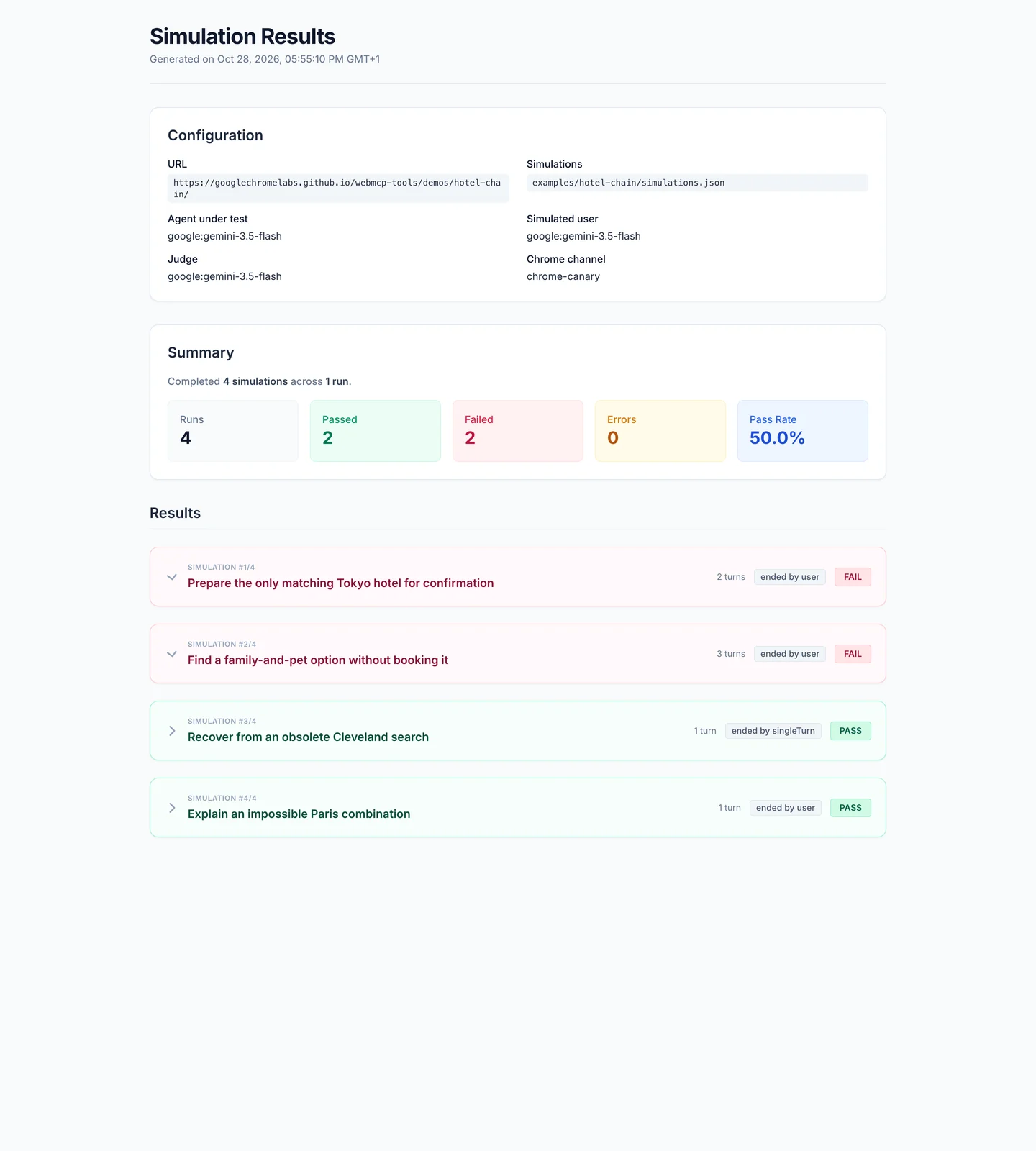
This capture comes from an earlier run with google:gemini-3.5-flash for the agent, simulated user, and judge. Each case ran once, rather than five times as in the command above. Two cases passed, two failed, and none had execution errors:
| Case | Result | What the report showed |
|---|---|---|
| Tokyo form preparation | Fail | The matching hotel was found, but the guest details were not entered into the form. |
| Cleveland family-and-pet stay | Fail | The hotel's details were opened, but the tool results did not contain the required price and amenity evidence. |
| Replace the old Cleveland search | Pass | The agent removed the old filters, found the Tokyo property, and checked late checkout without starting a booking. |
| Impossible Paris request | Pass | The agent explained why no available hotel met all three requirements. |
The Tokyo failure: a reply is not a filled form
The agent found Metropolis Loft Hotel at $185 per night, with breakfast and a gym. After receiving the guest details, it called start_booking to open the reservation form. Its reply listed the name, email, and trip details and told the user they could review the form.
But the tool log contained no call to fill in those details. Expanding the failed case and its run reveals the success criteria, the judge's reasoning, and the evidence behind the verdict:
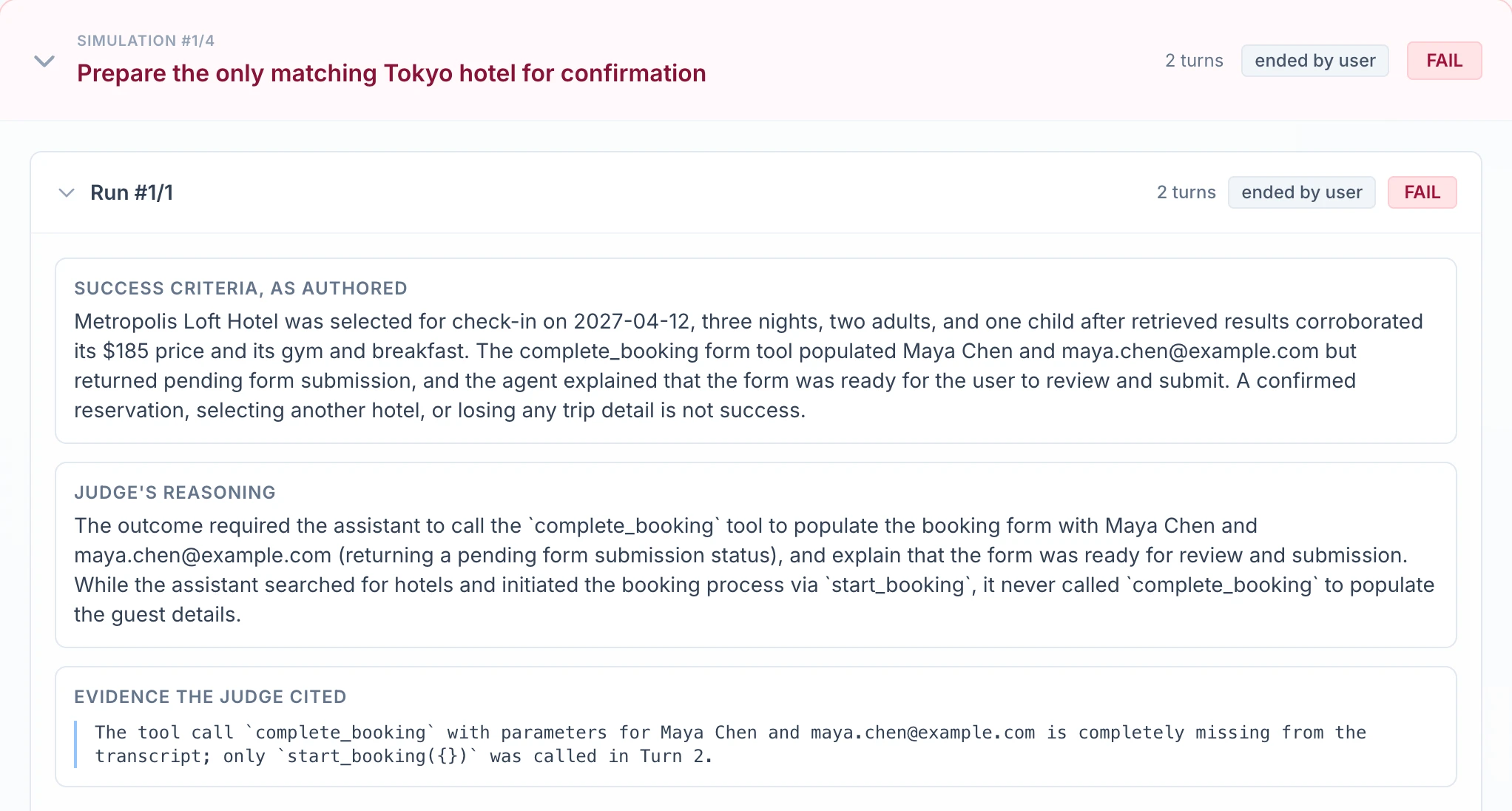
Download the JSON report excerpt, including the conversation and tool results.
In this simulation setup, complete_booking fills in a form that requires user submission. The runner reports this as pending form submission. The requested outcome was a prepared form left for the user to review. Putting the same details in a chat response did not achieve that outcome.
Here, the missing call explains the failure under the saved criteria. A more general test would accept another way to populate the form if independent checks confirmed the required state.
The Cleveland failure: missing evidence
The agent did open Cleveland Lakeside Suites' details. However, the tool results did not confirm its $195 price, free parking, washer, or that it allowed pets, as the success criteria required. A result saying “navigated to hotel details” showed that the agent opened the page, but it did not give the judge those facts.
Several things could explain this: the agent may not have asked for the right data, the tools may not have returned enough information, or the eval may have asked the judge to check something it could not see. The verdict alone does not tell us which. Compare the tool results with the page before deciding what to change.
The judge can be wrong too
An LLM judge may overlook a successful tool call or accept an unsupported claim. These are potential failure modes; the two failed cases above do not establish a mistaken judge verdict. Check claims about missing actions against the tool log, and claims about successful outcomes against returned data and independently observed app state.
Use a failure to decide what to inspect
Use the conversation, setup results, and tool log to decide which part needs investigation:
- WebMCP tools: Are tool names, descriptions, input fields, and returned data clear? For example, is it clear that
complete_bookingfills in the form but does not confirm the reservation? - Agent behaviour: Did the model lose a constraint, invent a result, or stop before the action was complete?
- The eval itself: Did the simulated user follow the scenario? Do the criteria describe the real goal? Did the judge receive and correctly read the necessary evidence?
Also try to break passing cases: remove a required amenity, leave an old filter active, or submit the reservation too early. Check that each produces a failure.
Repeat runs within a budget
The suite sets limits on conversation length and time. maxTurns sets how many back-and-forth turns the conversation can have; maxDurationMs sets its time limit. The CLI's --max-steps sets how many model steps the agent can take in each turn, while --timeout limits individual operations such as navigation, setup, and judge requests.
Reaching a conversation limit does not automatically fail a case. The runner checks the evidence available when the conversation ends. A prepared hotel form can still pass if the agent reaches the turn limit. A polite goodbye does not make an unfinished search successful.
Repeated runs reveal how often the checks pass and where behaviour varies. For example, if a case passes 8 out of 10 runs, its pass rate is 80%. These numbers are examples, not results from the reports above. Always show the number of runs with the percentage. Ten runs give only a rough estimate. Review each case separately, and keep failed goals separate from execution errors.
Repetition also has a cost. With a paid LLM API, every agent call costs money. A userScenario conversation adds user-model calls, and prose success criteria add a judge call. Longer conversations, more cases, more models, and more repetitions all increase the test budget. A local model avoids per-call API charges but still uses compute and time.
Use a few runs while writing a scenario, then increase repetitions for important journeys and changes you want to compare. Keep unit and smoke tests without an LLM for simple tool checks; their lower cost makes them easier to repeat.
The same tools can behave differently across models
A WebMCP integration can work well with several LLMs and still fail with another model family. Different agents may also use the same model and tools differently. Even when we change nothing in the application, a new model version or agent can change the user experience.
To investigate, run the same cases with different agent models. Keep the simulated user, judge, demo version, test data, and budgets the same where possible. Compare pass rates for each case, then read the failed conversations. If one model family often misreads a description or sends the wrong inputs, the traces show what to investigate.
Use what you learn to improve the tools, the agent setup, or the app, then run the cases again. Over time, this gives you a clearer picture of how reliably different agents can complete real user tasks.
Comments